
The note writes itself.
Turn each conversation with your patient into a structured clinical note, synced in real time from your computer to your phone.


A clinical record that fills itself in
Maestra is a clinical record for healthcare professionals: your patients, your agenda, and your notes in one place, on the web and on your phone. Transcribe the session and the note is written for you, structured and ready to review.
- 01
Transcribe the session
Start from your phone or your browser, at your desk or in the room.
- 02
Read the note
A structured clinical note comes back, shaped by a template you control.
- 03
Keep the record
Notes and patient history stay together in one encrypted record.
Your patient data, encrypted end-to-end
Maestra is built on a zero-knowledge architecture. Here is what that means in practice.
Maestra can't read your data
Your records are encrypted on your device. Maestra's servers only ever store encrypted data, so they cannot be read, even with full database access.
End-to-end encrypted
Patient fields, notes, and transcripts are encrypted before they ever leave your device, with a key derived from your password. Only you hold it.
Built around GDPR
Maestra is built around GDPR, with public docs on how your data is handled. AI providers process audio and text under data processing agreements, transiently and never stored.
Spend less time on admin and more with patients

Patient management
All your patients in one place. Shape the patient form with your own fields, and find anyone instantly with on-device search.

Complete patient records
Open a patient to see everything in one place: demographics, contacts, your custom fields, and their full appointment history. Start a new session or revisit any past note straight from their file.

Voice transcription
Transcribe sessions in real time and get a full transcript back. Transcription keeps going while you move around the app or lock your device, with a Live Activity on iOS.

Clinical notes
Structured clinical notes written for you from your session, built from a template you can shape section by section. Edit any generated note in place with the built-in editor.

Visit assistant
Ask clinical questions about the visit and get AI-assisted answers grounded in the patient's history, so you can make decisions faster without digging back through past notes.

Agenda
See your day at a glance and create appointments in seconds. Add a new or existing patient inline while booking, then jump straight into transcribing the session.
On every device you use
Use Maestra on the web, iPhone, iPad, and Android, whether at your desk or between appointments. Everything stays in sync instantly, so your notes and schedule are always up to date wherever you work.
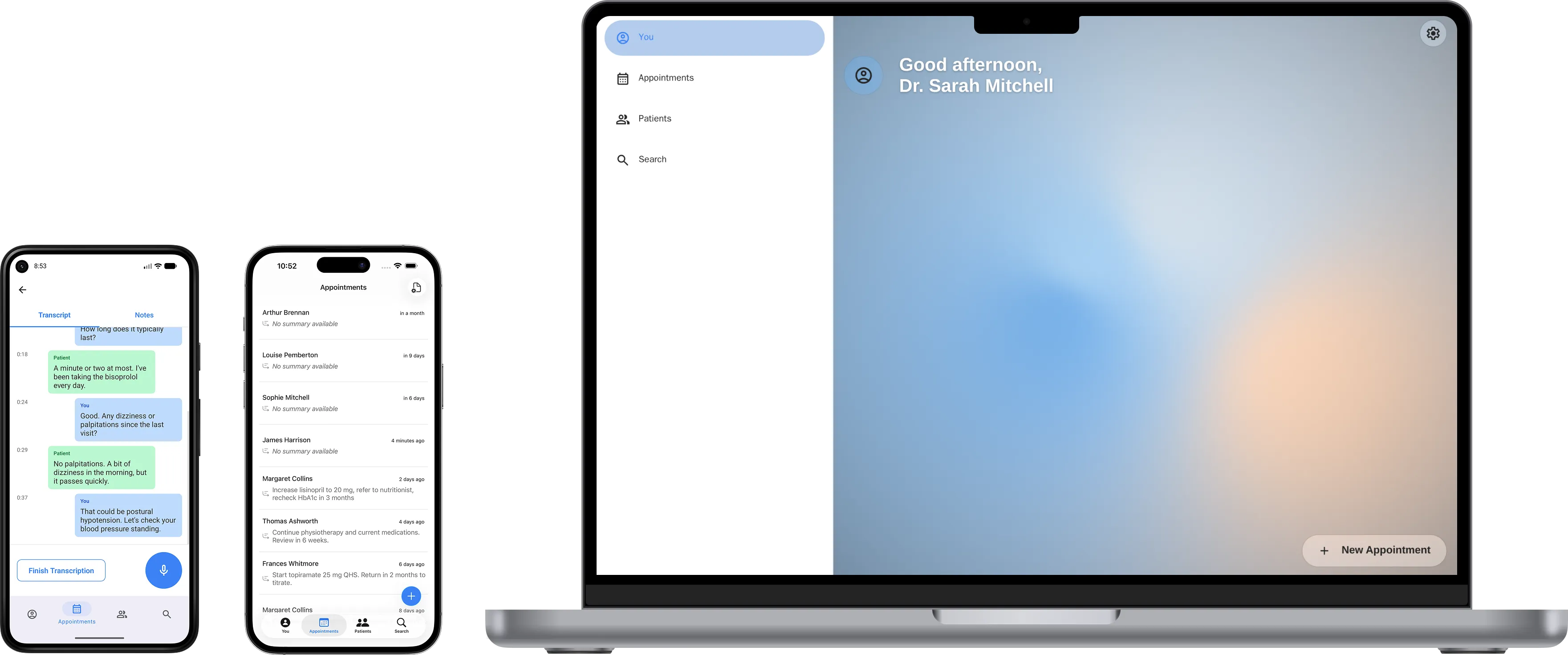
Built for healthcare professionals
Transcribe remote sessions from any browser tab
Already using Zoom, Meet, or Teams for video calls? Open Maestra in a second tab and transcribe the session in real time, captured locally in your browser, with no extra hardware or installation required.*
* Tab transcription requires Google Chrome.

See exactly how it works.
Before trusting any tool with your patients' data, you should verify how it works. Maestra's documentation covers the full encryption model, compliance posture, data handling practices, and every subprocessor it relies on.
Read the docsSecurity architecture
End-to-end encryption, key derivation, zero-knowledge design, and what the server can and cannot see.
Trust and compliance
Maestra is designed with GDPR and healthcare data regulations in mind, with a commitment to achieving full compliance as the platform grows.
Screen-by-screen guide
Every screen in the app documented in detail: what each field does, how actions work, and what to expect at each step.
Start free. Upgrade when you are ready.
Free
Keep access to everything already in your account. View and export your patients and appointments anytime, for free.
- View all your patients and appointments
- Export your data anytime
- Unlimited patients
- End-to-end encrypted
Maestra Pro
Full access to create appointments, transcription, and the visit assistant.
- 1-month free trial
- Unlimited appointments
- Visit assistant
- Voice transcription
- Everything included in Free
On the roadmap
Features actively being planned or built.
Calendar view: see your daily and weekly appointments at a glance
Patient flow: create states and rules to manage each patient's journey through your practice
Intelligent editor: AI text generation and processing, with customizable snippets for faster typing
Patient communications: send SMS or WhatsApp messages to confirm and remind patients of their visits
Clinic management: manage your clinic by creating an organization and inviting other professionals
Questions before you start
What clinicians ask most before transcribing their first session.
What is Maestra?
Maestra is a clinical record for healthcare professionals. It holds your patients, your agenda, and your clinical notes, and it transcribes each session to write the note for you, on the web, iPhone, iPad, and Android.
Who is Maestra for?
Maestra is built for independent healthcare professionals: psychologists, nutritionists, speech therapists, psychiatrists, and physicians across every specialty. It fits a solo practice today, and clinic management with several professionals is on the roadmap.
How does the clinical note get written?
Transcribe the session from your phone or your browser, in real time. A structured clinical note then comes back, built from a template you shape section by section. Every generated note stays editable in the app.
Can Maestra read my patient records?
No. Your records are encrypted on your device before they leave it, so Maestra's servers store only encrypted data that cannot be read, even with full database access. To transcribe your sessions and write your notes, audio and text pass through specialized AI processors under data processing agreements, transiently and never stored.
How is my data encrypted?
Every account holds a data key, unwrapped by a key derived from your password, that never leaves your device. Patient fields, notes, and transcripts are encrypted with it before any request is sent, so what reaches the servers is ciphertext. Appointment times and your account details stay readable, since they carry no clinical content.
What does the relay see during transcription?
Audio does not go to Maestra's API. It streams to a separate service, the relay, which forwards each chunk to the transcription provider and streams the result back without storing or inspecting it. Each transcript segment is then encrypted on your device before it is saved, so the API only ever receives ciphertext.
What happens if I forget my password?
Maestra shows your recovery key during setup, and you can view it again later from your account. It unlocks the same data key your password protects, so a forgotten password can be reset without losing access to your records. Keep that key somewhere safe: because only you hold the keys, records cannot be decrypted if both the password and the recovery key are lost.
Is there a free plan?
Yes. The free plan keeps unlimited patients, full access to everything already in your account, and data export at any time. Maestra Pro is US$50 per month for creating appointments, voice transcription, and the visit assistant, and it starts with a 1-month free trial.
Which devices does Maestra work on?
Maestra runs in the browser and as an app on iPhone, iPad, and Android, with everything synced instantly between them. For remote sessions, a second browser tab can transcribe the call from Zoom, Meet, or Teams, which requires Google Chrome.
Can I export my data?
Yes, at any time and on every plan. The export covers your patients, appointments, notes, and transcripts as JSON, decrypted on your device, so leaving is always possible.
Get started
Encrypted from the first session.
Start using Maestra and take control of your clinical data.